
Know Before You Go
Birmingham, AL
 VS
 The Indianapolis Clowns vs Firefighters
Regions Field
1401 1st Ave S, Birmingham, AL 35233
Your Gameday
Friday, March 12 Clowns vs Firefighters
- 3:30pm Plaza Opens + Player Appearance - Firefighter
- 4:00pm Player Appearance - Indianapolis Clowns
- 4:30pm Pre-Game Show Starts
- 5:30pm Gates Open
- 6:30pm Show Starts
Saturday, March 13 Clowns vs Firefighters
- 3:30pm Plaza Opens + Player Appearance - Firefighters
- 4:00pm Player Appearance - Indianapolis Clowns
- 4:30pm Pre-Game Show Starts
- 5:30pm Gates Open
- 6:30pm Show Starts
Gameday Information
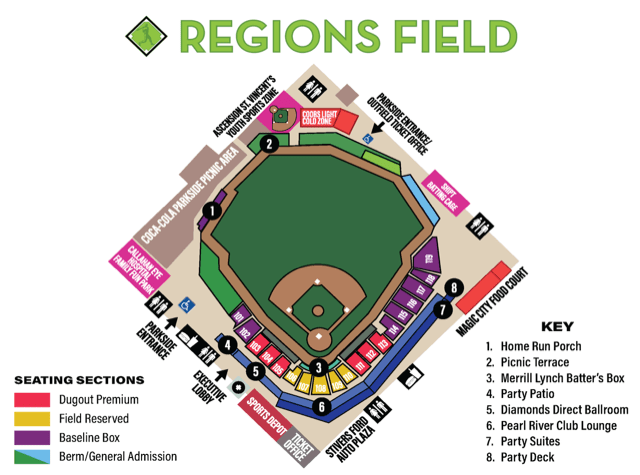
Banana Ball tickets are sold by Ticket Zones. Closer to the event, ticket holders will receive a specific Section, Row, and Seat assignment which corresponds to the stadium map. Keep an eye on the Fans First Tickets Management App for any updates to your tickets!
Pre-Game Day Assistance:
A few days prior to the event, your digital tickets will become available for download to your mobile wallet. For the smoothest entry experience, please follow the steps below to add all tickets to your digital wallet.
Need help with your tickets before game day? Check out our Ticket FAQ.
For help on show day:
We’ve got you covered! If you experience any issues with your tickets, visit one of our Ticket Help Tents. A Ticket Help station is available at each ticket scanning location outside the stadium.
For the best gameday experience – download the Fans First Tickets Management App!
This app is your one stop shop! Whether you already have tickets or you’re looking for seats, everything lives here!
- View and access your tickets
- Transfer tickets to friends and family
- List tickets and browse available tickets on the official Marketplace
- Scan in quickly on gameday
- Enable app notifications for important updates
Apple Wallet
Use the steps to download your tickets into your Apple Wallet for scanning!
- Log In to your Fans First Tickets Account
- Click Access Game Day Tickets
- Click Add to Apple Wallet
- Input your Pin or Face ID
- Click Add in the Top Right Corner
- Go to Apple Wallet App on your Device
- Once your Tickets Match the Picture Above, You Are Ready to Scan!
Google/Android Wallet
Use the steps to download your tickets into your Google Wallet for scanning!
- Log In to your Fans First Tickets Account
- Click Access Game Day Tickets
- Click Add to Google Wallet
- Input your Passcode
- Click Add in the Top Right Corner
- Go to Google Wallet app on your Device
- Once your Tickets Match the Picture Above, You Are Ready to Scan!
Get ready to dive into the action before the game even starts! Our Pre-Game Plaza offers an unforgettable experience filled with energy, excitement, and entertainment for fans of all ages. From live performances to interactive fun, it’s the perfect way to kick off your Banana Ball adventure.
At the heart of this Pre-Game excitement is Fire Drill Live! —the ultimate kickoff experience! Hosted by our energetic broadcasters and lively cast members, this show sets the tone for an unforgettable day of Banana Ball. Starting an hour before gates open, Fire Drill Live! features special appearances from players, cast, mascots, and other surprise guests. It’s a must-see event packed with music, dancing, laughter, and excitement to get you hyped up before gates even open!
You will also have the chance to swing by the merchandise tents during the Pre-Game plaza! You’ll find exclusive gear for the two teams playing in your city—because nothing says “game day ready” like rocking the freshest Banana Ball swag!
The Plaza is a ticketed space, fans must have tickets to the game to access the Plaza – no additional purchase required.
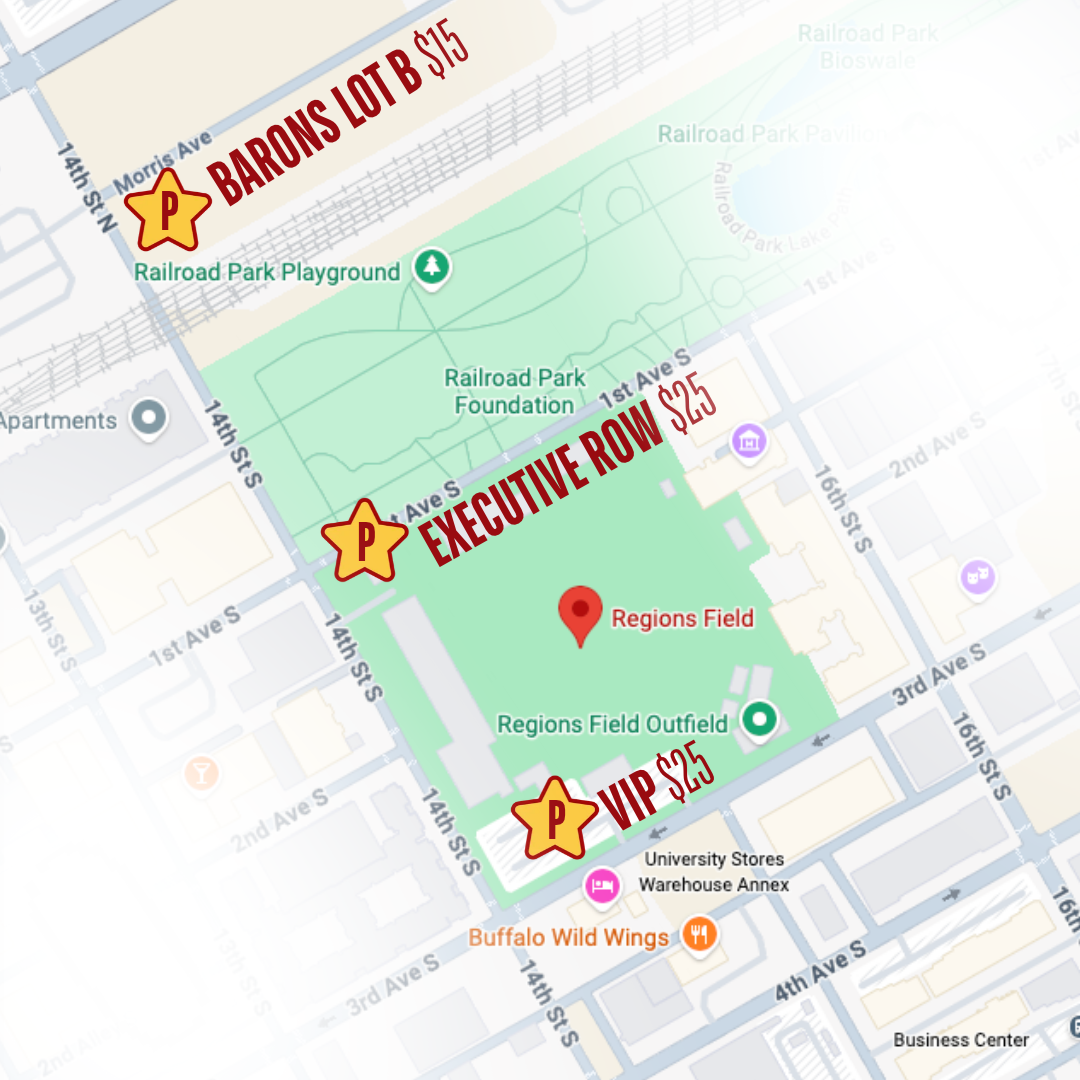
There are approximately 3,000 individual parking spaces within a five-minute walk from Regions Field.
Aside from all the reserved parking lot options around Regions Field, there are hundreds of street-side parking spots within a six-block radius of Regions Field available.
The Barons urge attending fans to pay attention to all signage, respect private property, and park in appropriate parking locations.
VIP – located on corner of 3rd and 14th st, $25
Exec – 1st Ave S entrance located on 14th St side, $25
Barons – located on 1st Ave N and 14th St. entrance off 14th st. $15
Link to purchase parking will come closer to the game date – lots will open approximately 1.5 hours before the plaza opens!
Entry Policy –
Clear Bag Policy:
- Fans will be encouraged not to bring any bags; however, the following will be permitted:
- One clear bag no larger than 16” x 8” x 16”
- A one-gallon clear freezer bag (Ziploc or similar)
- One empty water bottle per person. o In addition, fans may carry a small clutch bag no larger than 6.5” x 4.5”, with or without a strap.
Each ticket holder, including children, may carry an approved clear bag or a small clutch bag.
*Medical bags – Guests needing to carry a bag for required medical supplies or devices are permitted. However, all bags are subject to inspection by Regions Field security.
*Diaper Bags – Parents or guardians needing to bring in a diaper bag for their infant will be allowed to do so, subject to inspection by Regions Field security. Must have accompanying infant in order to bring in a diaper bag.
Security –
Prohibited Items
- Aerosol cans
- Animals (except certified service animals)
- Baseball bats
- Beach balls
- Glass bottles
- Fireworks
- Firearms or other weapons
- Hard-sided coolers
- Laser devices or pointers
- Noisemaking devices
- Outside Food and Beverage
- Skateboards, rollerblades, or wheeled vehicles
- Toy guns or knives
- Sticks or clubs
- Unmanned Aerial Vehicles
*No Re-Entry Allowed*
First aid EMT’s are located on the main concourse directly behind section 107 and the right field foul pole.
A medical cart is available as needed.
Guest Services is located directly in front of the main gates on the main concourse, behind section 108.
ADA:
All stadium entrances are ADA accessible with abundant ADA seating available throughout the main seating bowl. Wheelchair service is available upon request.
**Elevators available for transport to all levels.
Banana Ball merchandise will be available in the Plaza and in the Stadium. Merchandise will be available exclusively for the two teams playing in your city.
Our Banana Ball Merchandise Tents are CASHLESS.
Want to show up to your game in style? Check out our online store by clicking below!
A wide variety of food & beverages, from traditional ballpark fare to foods with local flavor are available behind sections 101, 111/112 and 118/119 and at numerous mobile carts locations throughout Regions Field.
Have Kclub exclusive tickets? We’ve got some extra fun in store for you!
All KClub ticket holder information, including venue and/or ticket perks, will be communicated ahead of your game day. Keep your eyes peeled and be sure to check back here as game day approaches for the latest details.
GET READY TO GO BACKSTAGE!
You’re not just coming to watch Banana Ball… you’re getting a chance to experience the magic behind it! Banana Ball Backstage is an exclusive pregame experience that brings you closer to the players, personalities, and unforgettable moments that make Banana Ball unlike anything else.
Get ready for a player-packed meet and greet filled with opportunities for photos, autographs, and personal interactions with some of your favorite Banana Ball stars! Along the way, you may discover a few backstage secrets, get a behind-the-scenes look at the show, and experience some fun surprises! Every Banana Ball Backstage experience is a little different, and that’s part of the fun!
What You Need to Know
If you’ve purchased Banana Ball Backstage tickets, keep an eye on your inbox! You’ll receive an email on the Tuesday before your event with important event-specific information, including arrival instructions, check-in details, and everything you need to know before your Backstage experience. We can’t wait to welcome you Backstage!
We never want to talk about the “4 letter word that starts with an R,” but sometimes it’s wise to.
We never want to talk about the “4 letter word that starts with an R”, but sometimes it’s wise to. Our team closely monitors the forecast and does everything humanly (and Bananaly) possible to keep games on schedule. 9 times out of 10, we’re playing ball once the weather clears. 10 times out of 10, we STILL put on a heck of a show!
Even if it’s raining where you’re coming from, conditions at the ballpark may be completely different. So, our advice? Plan to arrive on time and ready to have a ball!
If weather impacts game time or any event details, we’ll communicate directly with ticket holders through app notifications. We’ll also share updates across our social media channels so you know exactly what’s happening.