
Know Before You Go
Milwaukee, WI
No upcoming games scheduled here yet.
American Family Field
1 Brewers Way, Milwaukee, WI 53214
Your Gameday
Typical gameday Times are relative to first pitch. Exact times appear once games are scheduled here.
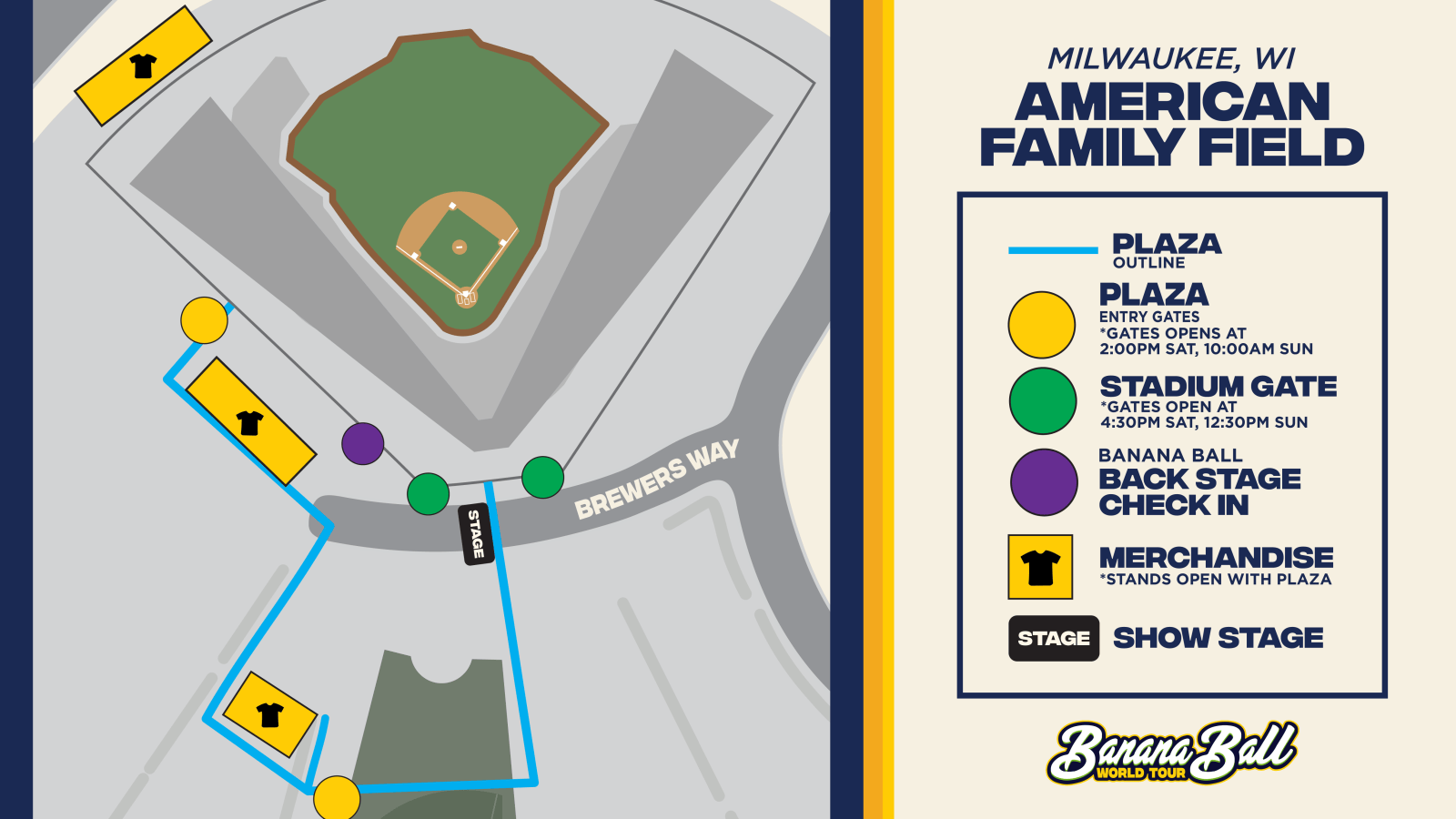
- -4h 30m Pre-Game Plaza Opens
- -3h 30m Pre Party LIVE
- -2h Gates Open Have your digital ticket ready
- Go First pitch
Everything Else
Ticket Zones & Seating Assignments:
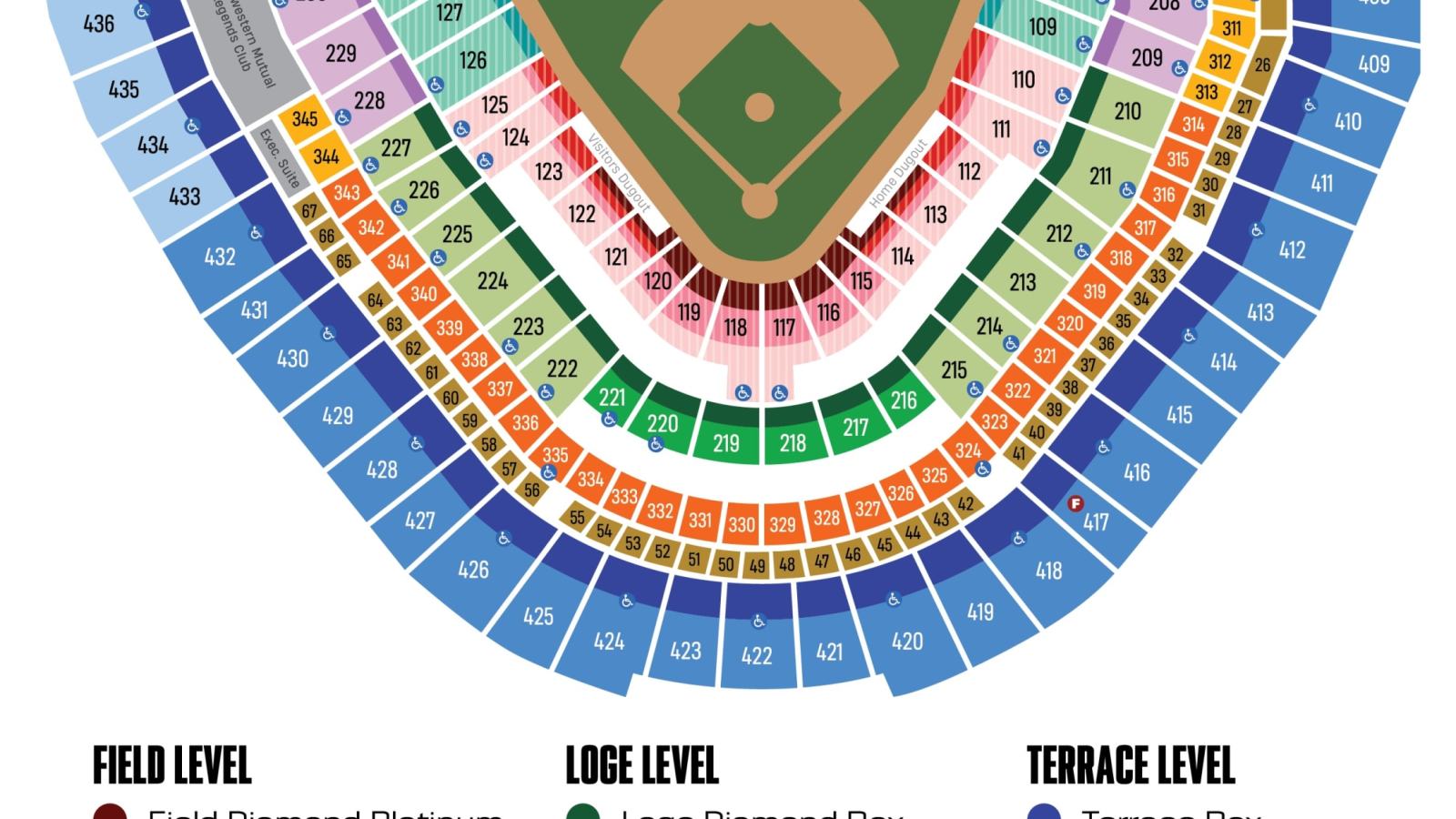
Banana Ball tickets are sold by Ticket Zones. The Ticket Zones below correspond to the ballpark map on the left.
Closer to game day, you will receive a specific Section, Row, and Seat that is assigned within the Ticket Zone that was originally purchased.
Pre-Game Day Assistance:
Closer to the first pitch of the game your digital tickets will become available for download to your mobile wallet. For fastest, smoothest entry, please follow the steps below to add all tickets to your digital wallet.
Need help with your tickets before game day? Check out our Ticket FAQ.
Game Day Assistance:
If you have any issues with tickets on game day, stop by one of our Ticket Help Tents for assistance. A Ticket Help station is available at each ticket scanning location outside the ballpark.
For the best gameday experience – download the Fans First Tickets Management App!
This app is your one stop shop! Whether you already have tickets or you’re looking for seats, everything lives here!
- View and access your tickets
- Transfer tickets to friends and family
- List tickets on the official Marketplace
- Browse available tickets for upcoming games
- Scan in quickly on gameday
Apple Wallet
Use these steps to download your tickets into your Apple Wallet!
- Log In to your Fans First Tickets Account
- Click Access Game Day Tickets
- Click Add to Apple Wallet
- Input your Pin or Face ID
- Click Add in the Top Right Corner
- Go to Apple Wallet App on your Device
- Once your Tickets Match the Picture Above, You Are Ready to Scan!
Google/Android Wallet
Use these steps to download your tickets into your Google Wallet!
- Log In to your Fans First Tickets Account
- Click Access Game Day Tickets
- Click Add to Google Wallet
- Input your Passcode
- Click Add in the Top Right Corner
- Go to Google Wallet app on your Device
- Once your Tickets Match the Picture Above, You Are Ready to Scan!
American Family Field has moved to a License Plate Recognition system for all parking lots. Parking attendants will be onsite to direct people to specific spots, however there will no longer be cashiers or scanners.
Fans can either pre-purchase advance parking and activate their parking once on-site or purchase parking onsite via a QR code. Payments for parking can be made with Apple Pay, Google Pay or credit card.
Fans are encouraged to limit their carry-in items in the interest of expediting the entry process for all fans.
Permitted Items:
The following items will be permitted to be brought into American Family Field and will be subject to inspection at the screening areas:
- Clear single-compartment bags 12″ x 12″ x 6″ or smaller
- Non-clear bags 9″ x 5″ x 2″ or smaller
- One-gallon clear sealable bags
- Non-alcoholic sealed plastic bottles (32 ounces or smaller/one per person)
- Personal size food items (e.g., a sandwich, small bags of pretzels, piece of fruit)
- Strollers, Wheelchairs, Umbrellas
For a full list of prohibited items click here!
Re-Entry Policy: Re-entry will not be available.
Get ready to dive into the action before the game even starts! Our Pre-Game Plaza offers an unforgettable experience filled with energy, excitement, and entertainment for fans of all ages. From live performances to interactive fun, it’s the perfect way to kick off your Banana Ball adventure.
At the heart of this pre-game excitement is Pre Party LIVE the ultimate kickoff experience! Hosted by our energetic broadcasters and lively cast members, this show sets the tone for an unforgettable day of Banana Ball. Starting an hour before gates open, Pre Party LIVE features special appearances from players, cast, mascots, and other surprise guests. It’s a must-see event packed with music, dancing, laughter, and excitement to get you hyped up before gates even open!
You will also have the chance to swing by the merchandise tents during the pre-game plaza! You’ll find exclusive gear for the two teams playing in your city, because nothing says “game day ready” like rocking the freshest Banana Ball swag!
The Plaza is a ticketed space, fans must have tickets to the game to access the Plaza – no additional purchase required.
Fan Services Locations: Field Level near section 116, and Terrace Level behind section 419.
First Aid: Located on the Field and Terrace Levels behind home plate.
Cashless Facility: American Family Field is a cashless facility. Digital forms of payment (i.e. Apple Pay and Google Pay) are also accepted at select locations. For your convenience, ATMs provided by Associated Bank are located on the Field Level in the following areas: Home Plate East Gate, Left Field Gate, UScellular Power Playground.
Sensory Friendly Resources: Sensory bags, equipped with noise canceling headphones, fidget tools, verbal cue cards, and weighted lap pads will be available at any Brewers Guest Relations kiosk (located on the Field Level near Section 116, and on the Terrace Level behind Section 419) for guests who may feel overwhelmed by the environment. All sensory bags must be returned to Guest Relations at the end of the game. In addition, a Quiet Area with a sensory bubble wall that provides calm lighting and sounds is available for guests who are experiencing sensory overload. The Quiet Area is located on the Terrace Level behind Section 426. Please visit Guest Relations behind Section 419 for access. For more information on the services provided, please visit
Smoking Policy: American Family Field is a non-smoking facility. We appreciate your cooperation in making the ballpark a safe, fun, family-friendly environment.
The full A-Z Guide for the American Family Field can be found here!
Banana Ball Merchandise will be available in the Plaza and in the Stadium. Merchandise will be available exclusively for the two teams playing in your city.
Our Banana Ball Merchandise Tents are CASHLESS.
Want to show up to your game in style? Check out our online store by clicking here!
Food: The ballpark will have your usual ballpark goodies like hot dogs and cheeseburgers available for purchase on site. Bring your appetite – treat yourself.
Beverages: There will be a delightful selection of alcoholic beverages available for purchase on site, if that is your thing.
Dietary Restrictions: Guests with specific dietary needs or restrictions have access to information regarding food options at American Family Field at all Brewers Guest Relations kiosks. Locations include Field Level near section 116, Loge Level behind section 221, and Terrace Level behind section 419. Guests with questions about specific food offerings may also inquire with Delaware North personnel at any concessions location to receive specific information.
American Family Field is ADA accessible, offering wheelchair accessible parking, entrances, restrooms, and seating.
For more information click here.
🎟️ Milwaukee K Club Raffle! 🎟️
Please note that there will not be a designated K Club Plaza space in Milwaukee this weekend. Instead, we’ll be bringing the fun to you through a digital raffle packed with special game-day experiences and prizes!
We’re excited to share what we have planned and can’t wait to see you in Milwaukee this weekend!
Not a part of the K Club this season? Click here to add your name to the 2027 Interest List for information about joining in the 2027 season!
What It Is: The Banana Ball Backstage experience includes admission PLUS early entry for an exclusive meet and greet experience on the field with our players and cast members! It will also include some fun swag items!
Start Times:
Saturday, June 6th: @3:30pm
Sunday, June 7th: @11:30am
Check In: On game day, you will need to check in for the Banana Ball Backstage Experience. We recommend you are checked-in at least 15 minutes before your start time. Further information about where to check in will be shared here and emailed to you closer to game day
*If weather does not permit for the on field experience, we will relocate to a safe and dry area!
Your favorite Banana Ball cast members will be serving up coffee, donuts, and dance moves at a local Dunkin’. If you’re in the area and want to have a little extra Banana Ball fun, come on through to Dunkin’.
Come say Hi at Dunkin’ on Saturday, June 6th from 9-11am!
Location: 2068 Miller Park Way, West Milwaukee, WI
Your favorite Party Animals and Loco Beach Coconuts are partnering with EvoShield to meet fans and sign autographs at Burghardt Sporting Goods — Milwaukee’s Baseball & Softball Superstore.
Shop licensed Banana Ball gear and meet select players on Friday, June 5th from 6:30-8:30pm.
Location: 15333 W National Avenue New Berlin, WI, 53151
Fans are welcome to bring blankets and towels to sit on in the outfield lawn. Please see the Entry Policy list above for more information on prohibited items.
We never want to talk about the “4 letter word that starts with an R”, but sometimes it’s wise to.
“It’s raining where I am coming from – Is the game still on?” – the answer is YES!
American Family Field has a roof that can cover the field in the event of inclement weather!