
Know Before You Go
Cincinnati, OH
No upcoming games scheduled here yet.
Great American Ballpark
100 Joe Nuxhall Wy, Cincinnati, OH 45202
Your Gameday
Typical gameday Times are relative to first pitch. Exact times appear once games are scheduled here.
- -4h 30m Pre-Game Plaza Opens
- -4h 30m Player Appearances
- -3h 30m Pre-Show Entertainment
- -2h Gates Open Have your digital ticket ready
- Go First pitch
Everything Else
Ticket Zones & Seating Assignments:
Closer to the event, ticketholders will receive a specific Section, Row, and Seat. Stay tuned for emails with more information!
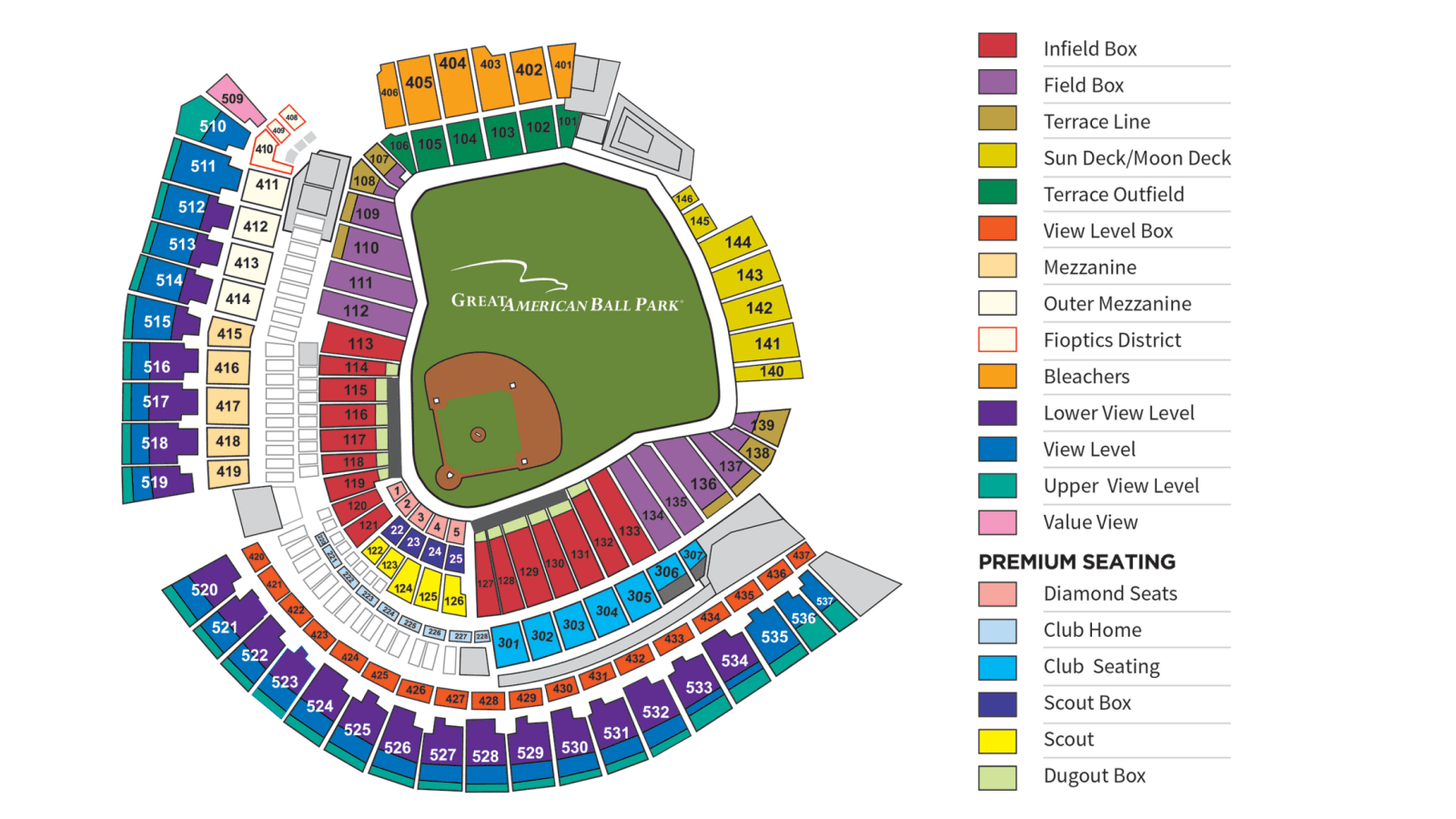
Banana Ball tickets are sold by Ticket Zones. The Ticket Zones below correspond to the ballpark map to the left.
Pre-Game Day Assistance:
Closer to the first pitch of the game, your digital tickets will become available for download to your mobile wallet. For fastest, smoothest entry, please follow the steps below to add all tickets to your digital wallet. Next steps coming soon!
Need help with your tickets before game day? Check out our Ticket FAQ.
Game Day Assistance:
If you have any issues with tickets on game day, stop by one of our Ticket Help Tents for assistance. A Ticket Help station is available at each ticket scanning location outside the stadium.
For the best gameday experience – download the Fans First Tickets Management App!
This app is your one stop shop! Whether you already have tickets or you’re looking for seats, everything lives here!
- View and access your tickets
- Transfer tickets to friends and family
- List tickets on the official Marketplace
- Browse available tickets for upcoming games
- Scan in quickly on gameday
Apple Wallet
Use the steps to download your tickets into your Apple Wallet for scanning!
- Log In to your Fans First Tickets Account
- Click Access Game Day Tickets
- Click Add to Apple Wallet
- Input your Pin or Face ID
- Click Add in the Top Right Corner
- Go to Apple Wallet App on your Device
- Once your Tickets Match the Picture Above, You Are Ready to Scan!
Google/Android Wallet
Use the steps to download your tickets into your Google Wallet for scanning!
- Log In to your Fans First Tickets Account
- Click Access Game Day Tickets
- Click Add to Google Wallet
- Input your Passcode
- Click Add in the Top Right Corner
- Go to Google Wallet app on your Device
- Once your Tickets Match the Picture Above, You Are Ready to Scan!
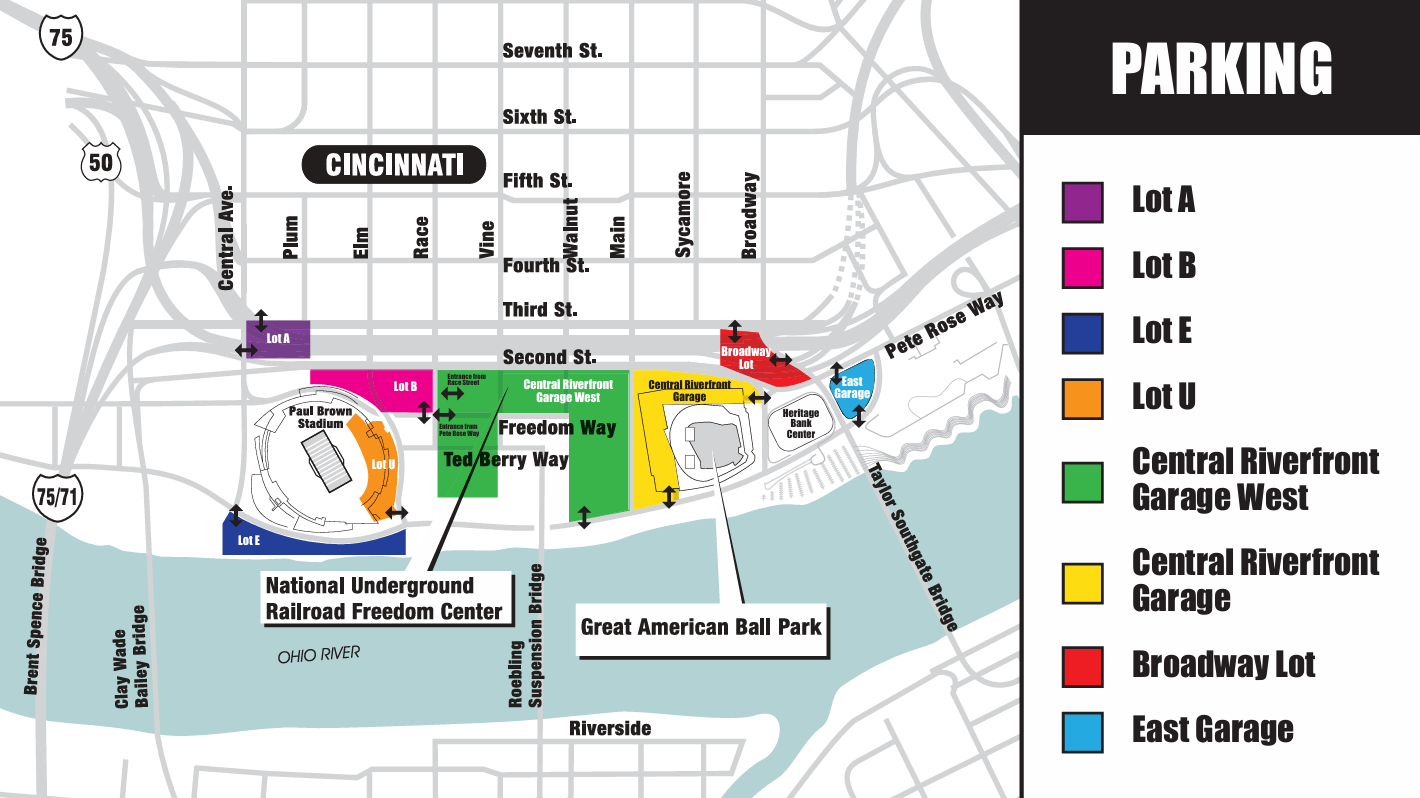
The Cincinnati Reds provide multiple parking lots and garages near the ballpark, including the Central Riverfront garage. In an effort to make your trip to the ballpark as easy as possible, we recommend using one of the addresses listed below in your GPS device for the best route to one of these entry points:
- Central Riverfront Garage
- 202 East Mehring Way – recommended entrance
- East Garage
- 502 East Mehring Way – recommended entrance
- Central Riverfront Garage West
- 102 West Pete Rose Way – recommended entrance
Purchase Links:
ADA parking: ADA parking at Great American Ball Park is available on a first-come, first-served basis in all Cincinnati Reds parking areas. There are a total of 1,600 handicap parking spaces available, located on all levels of the parking garage. A valid handicap placard or license plate is required to park in a handicap parking space.
Bags can be brought into the ballpark under the following restrictions:
-
Backpacks (defined as multi-pocketed bags that are worn on the back) are prohibited unless they are specifically designed for medical or infant care)
-
Bags cannot exceed the size of 16” x 16” x 8”
-
Reds Heads Bags that were provided beginning in 2020
-
The following can be brought into the Ballpark:
-
Soft-sided Coolers that contain food and/or non-alcoholic drinks in sealed plastic bottles
-
Small purses
-
Food bags
-
Unopened drinks in sealed plastic bottles that are non-alcoholic
-
Please Note: All carry-in items will be subject to inspection upon entry or at any time while inside of the Ballpark. Bags cannot be left unattended at any time.
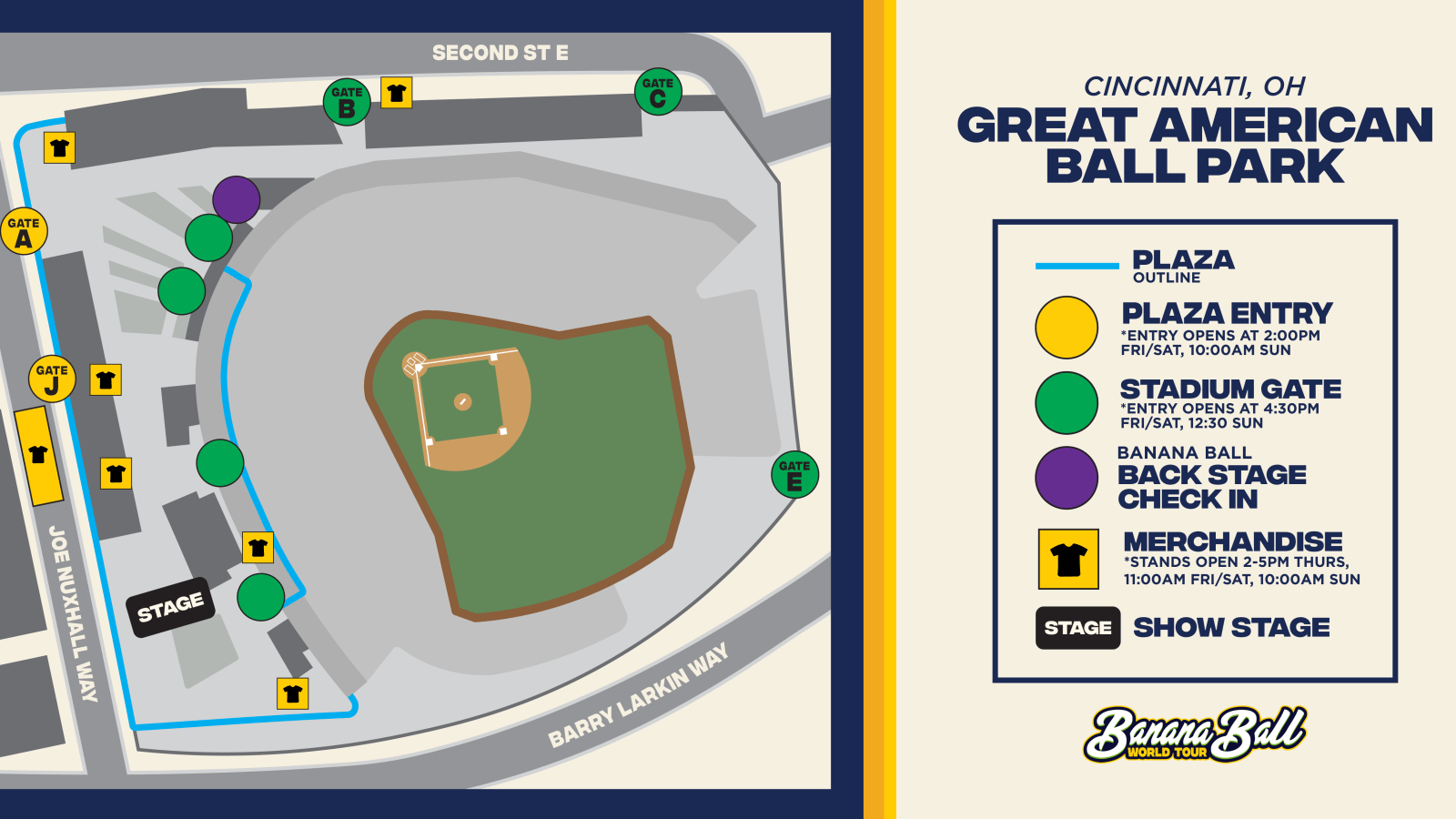
Get ready to dive into the action before the game even starts! Our Pre-Game Plaza offers an unforgettable experience filled with energy, excitement, and entertainment for fans of all ages. From live performances to interactive fun, it’s the perfect way to kick off your Banana Ball adventure.
At the heart of this Pre-Game excitement is –The Opening Act- the ultimate kickoff experience! Hosted by our energetic broadcasters and lively cast members, this show sets the tone for an unforgettable day of Banana Ball. Starting an hour before gates open, Before the Peel features special appearances from players, cast, mascots, and other surprise guests. It’s a must-see event packed with music, dancing, laughter, and excitement to get you hyped up before gates even open!
You will also have the chance to swing by the merchandise tents during the Pre-Game plaza! You’ll find exclusive gear for the two teams playing in your city, because nothing says “game day ready” like rocking the freshest Banana Ball swag!
The Plaza is a ticketed space, fans must have tickets to the game to access the Plaza – no additional purchase required..
Fan Services: There are three accommodation Stations in Great American Ball Park. On the Terrace Level near Section 119, on the View Level near Section 420, and in the Fan Zone.
First Aid Location: Guests will find the Great American Ball Park First Aid Stations in the following locations:
- Terrace Level near Sections 125–126.
- On the Terrace Level near Sections 109–110.
- View Level near Section 411.
Cashless Policy: Great American Ball Park is a cashless venue. For your convenience, PNC Bank ATM machines are located near Section 119 and Section 427.
Nursing Room: There are two Nursing Suite locations in Great American Ball Park.
- Pampers Nursing Suite Built by Fischer Homes: Located on the Suite Level, go to the Champions Club elevator featuring Rosie Red and the Pampers Nursing Suite logo and take it to Suite Level.
- Pampers Nursing Suite, presented by TriHealth: Located on the View Level by the TriHealth Family Zone, go to The Handlebar elevator and take it to the View Level.
The TriHealth Family Zone occupies concourse space behind the adjacent sections in the right field corner of the View Level. As part of the TriHealth Family Zone, fans will have access to a sensory room, a therapeutic space with a variety of equipment that provides individuals with special needs a safe location with personalized sensory input and is staffed by TriHealth Medical Personnel.
Lost and Found: Guests may inquire about lost and found articles by calling (513) 765-7911 or asking at the TriHealth Fan Accommodation Stations from gate opening to the conclusion of the game. The Cincinnati Reds are not responsible for any items left on premises.
Tobacco Use: Great American Ball Park has been designated as a completely non-smoking facility under Ohio Law. Therefore, it is the obligation of staff to ensure that smoking or vaping of any substance does not occur inside Great American Ball Park.
For a full A-Z guide of Great American Ball Park, click here!
Banana Ball Merchandise Tents are located both outside and inside the ballpark. Merchandise will be available exclusively for the two teams playing in your city.
Our Banana Ball Merchandise Tents are CASHLESS.
Want to show up to your game in style? Check out our online store by clicking here!
Food: The ballpark will have your usual ballpark goodies like hot dogs and cheeseburgers available for purchase on site as well as a variety of menu options. Click here to view the list of gluten-free options!
For more information on concessions, please call (513) 765-7571
Beverages: There will be a delightful selection of alcoholic beverages available for purchase on site, if that is your thing.
*ALL concession stands are cashless payments only
For the full food guide at Great American Ball Park, click here!
K Club, who wants to win some prizes!?!?!?!
Due to the way that the plaza is set up this weekend in Cincinnati, we won’t have an exclusive zone available for us. This means there will be no separate K Club area in the plaza or inside the ballpark.
To add to the already fun weekend, we’ll be giving out prizes and experiences via a raffle (linked below). Members who enter the raffle will have the chance to win exclusive Banana Ball experiences and prizes throughout game day.
Friday, June 19th Raffle: click here
Saturday, June 20th Raffle: click here
Sunday, June 21st Raffle: click here
*only K Club members are eligible to win prizes & experiences*
Not a part of the K Club this season? Click here to add your name to the 2027 Interest List for information about joining in the 2027 season!
What It Is: The Banana Ball Backstage experience includes admission PLUS early entry for an exclusive meet and greet experience on the field with our players and cast members! It will also include some fun swag items!
Start Times:
Friday, June 19th: 3:30pm
Saturday, June 20th: 3:30pm
Sunday, June 21st: 11:30am
Check In: On game day, you will need to check in for the Banana Ball Backstage Experience. We recommend you are checked-in at least 30 minutes before your start time. Further information about where to check in will be shared here and emailed to you closer to game day
*If weather does not permit for the on field experience, we will relocate to a safe and dry area!
Go Bananas for a cause! At this event, there will be a 50/50 raffle supporting Bananas Foster, the official nonprofit of Banana Ball! Here’s how it works:
- Purchase your tickets at the stadium, or you can purchase online here: [insert link if online sales are available] *must be located in the state to purchase. A full list of rules and regulations are explained on this site.
- One lucky fan takes home half of the total jackpot! Imagine leaving the stadium with more than just great memories!
- The other half? Making a difference and goes towards supporting Bananas Foster and the Reds Community Fund.
Every ticket you buy makes a difference for the foster care community! Play big, give big, win big—that’s Banana Ball energy.
To learn more about Bananas Foster, click here! To learn more about the Reds Community Fund, please click here!
Your favorite Banana Ball players and cast members will be serving up coffee, donuts, and dance moves at a local Dunkin’. If you’re in the area and want to have a little extra Banana Ball fun, come on through to Dunkin’.
Come see us at Dunkin on Saturday June 20th from 9am-11am!
Location: 5055 Delhi Ave, Cincinnati, OH
Your favorite Savannah Bananas and Indianapolis Clowns are partnering with EvoShield to meet fans and sign autographs at Koch Sporting Goods in downtown Cincinnati.
Shop licensed Banana Ball gear and meet select players on Thursday, June 18th from 6:30-8:30pm.
Location: 131 W 4th St, Cincinnati, OH 45202
Check out our friend Visit KC page for information about places to stay, play, and eat during the Banana Ball games in Kansas City! View here!
We never want to talk about the “4 letter word that starts with an R”, but sometimes it’s wise to.
“It’s raining where I am coming from – Is the game still on?” – the answer is YES! Keep in mind, the ballpark is in a big and beautiful area. While it may be raining where you are coming from, there is probably sunshine and butterflies in Bananaland.
Even if it’s wet – We always closely monitor the weather, and do everything humanly (and Bananaly) possible in order to play games as they are scheduled.
9 times out of 10, we’re playing ball once the weather clears. 10 times out of 10, we STILL put on a heck of a show!
Best thing you can do is plan to be at the ballpark ready to rock, as we anticipate everything to start on time! Should things change, we will communicate via email as well as post on our social media accounts!