
Know Before You Go
Fargo, ND
No upcoming games scheduled here yet.
Newman Outdoor Field
1515 15th Ave N, Fargo, ND 58102
Your Gameday
Typical gameday Times are relative to first pitch. Exact times appear once games are scheduled here.
- -3h Pre-Game Plaza Opens
- -3h Player Appearances
- -2h Pre-Show Entertainment
- -1h Gates Open Have your digital ticket ready
- Go First pitch
Everything Else
Ticket Zones & Seating Assignments:
Closer to the event, ticketholders will receive a specific Section, Row, and Seat. Stay tuned for emails with more information!
Banana Ball tickets are sold by Ticket Zones.
Standing Room Only: A portion of tickets were sold as Standing Room Only. Those are general admission areas in the ballpark along the foul lines. There will be no seated area for these tickets.
Pre-Game Day Assistance:
Closer to the first pitch of the game your digital tickets will become available for download to your mobile wallet. For quickest access, ticketholders must download your tickets PRIOR to arriving at the stadium.
Need help with your tickets before game day? Check out our Ticket FAQ.
Game Day Assistance:
If you have any issues with tickets on game day, stop by one of our Ticket Help Tents for assistance. A Ticket Help station is available at each ticket scanning location outside the ballpark.
For the best gameday experience – download the Fans First Tickets Management App!
This app is your one stop shop! Whether you already have tickets or you’re looking for seats, everything lives here!
- View and access your tickets
- Transfer tickets to friends and family
- List tickets on the official Marketplace
- Browse available tickets for upcoming games
- Scan in quickly on gameday
Apple Wallet
Use the steps to download your tickets into your Apple Wallet for scanning!
- Log In to your Fans First Tickets Account
- Click Access Game Day Tickets
- Click Add to Apple Wallet
- Input your Pin or Face ID
- Click Add in the Top Right Corner
- Go to Apple Wallet App on your Device
- Once your Tickets Match the Picture Above, You Are Ready to Scan!
Google/Android Wallet
Use the steps to download your tickets into your Google Wallet for scanning!
- Log In to your Fans First Tickets Account
- Click Access Game Day Tickets
- Click Add to Google Wallet
- Input your Passcode
- Click Add in the Top Right Corner
- Go to Google Wallet app on your Device
- Once your Tickets Match the Picture Above, You Are Ready to Scan!
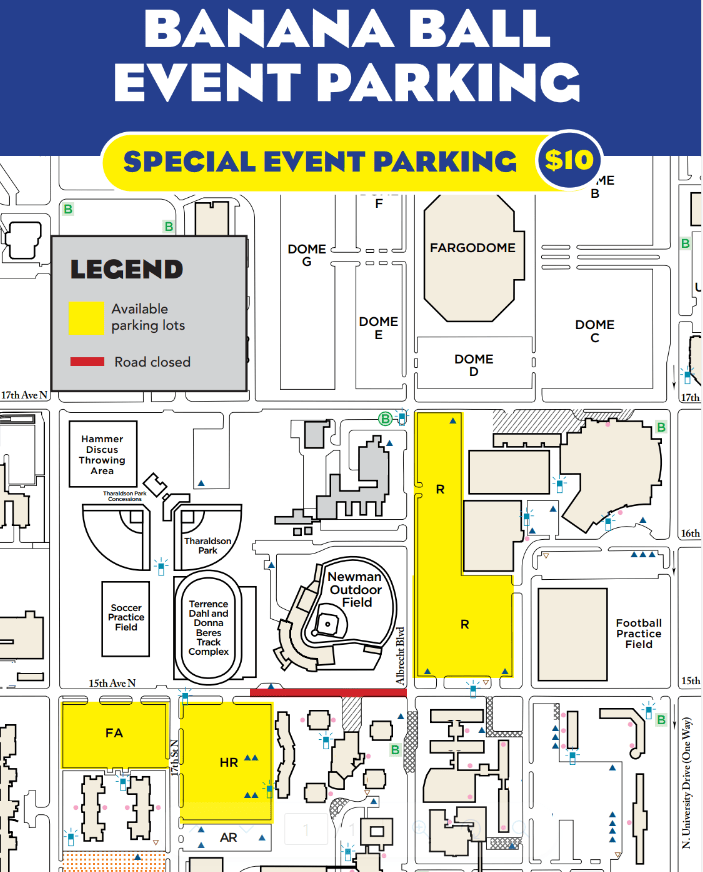
Parking is open in North Dakota State University parking lots “R” and “HR” from May through August. Parking is $10 per car.
Parking is at your own risk! The Fargo-Moorhead RedHawks, Newman Outdoor Field, North Dakota State University, the American Association and opposing teams are not liable for any damage incurred due to foul balls or home runs that may travel into the parking areas.
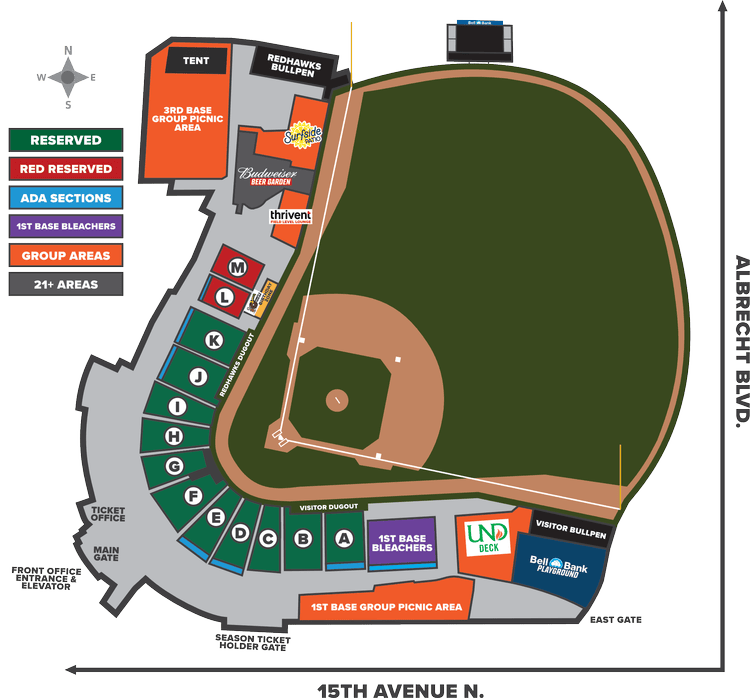
The ballpark is located at 1515 15th Ave N. on the corner of 15th Ave N and Albrecht Blvd.
Bag Policy: Newman Outdoor Field has a clear bag policy. This policy limits the type of bags that may be brought into the stadium. Exceptions to this policy will be made for all medically necessary items and diaper bags (one per family) after proper inspection. All bags are subject to being searched before entry. Fans will not be allowed to enter the premises with a non-conforming bag and will be asked to return items to their vehicles.
Fans will be allowed to enter with the following:
-
Clear totes made of plastic, vinyl, or PVC
-
Clear plastic one-gallon re-sealable bag, or a small clutch purse (approximately the size of a hand). This may be carried separately or within an approved clear bag.
Strollers: Strollers may be checked in at the Guest Relations Booth located just inside the main gate on the concourse, otherwise they are prohibited.
Re-Entry: There is no re-entry into Newman Outdoor Field on the same ticket.
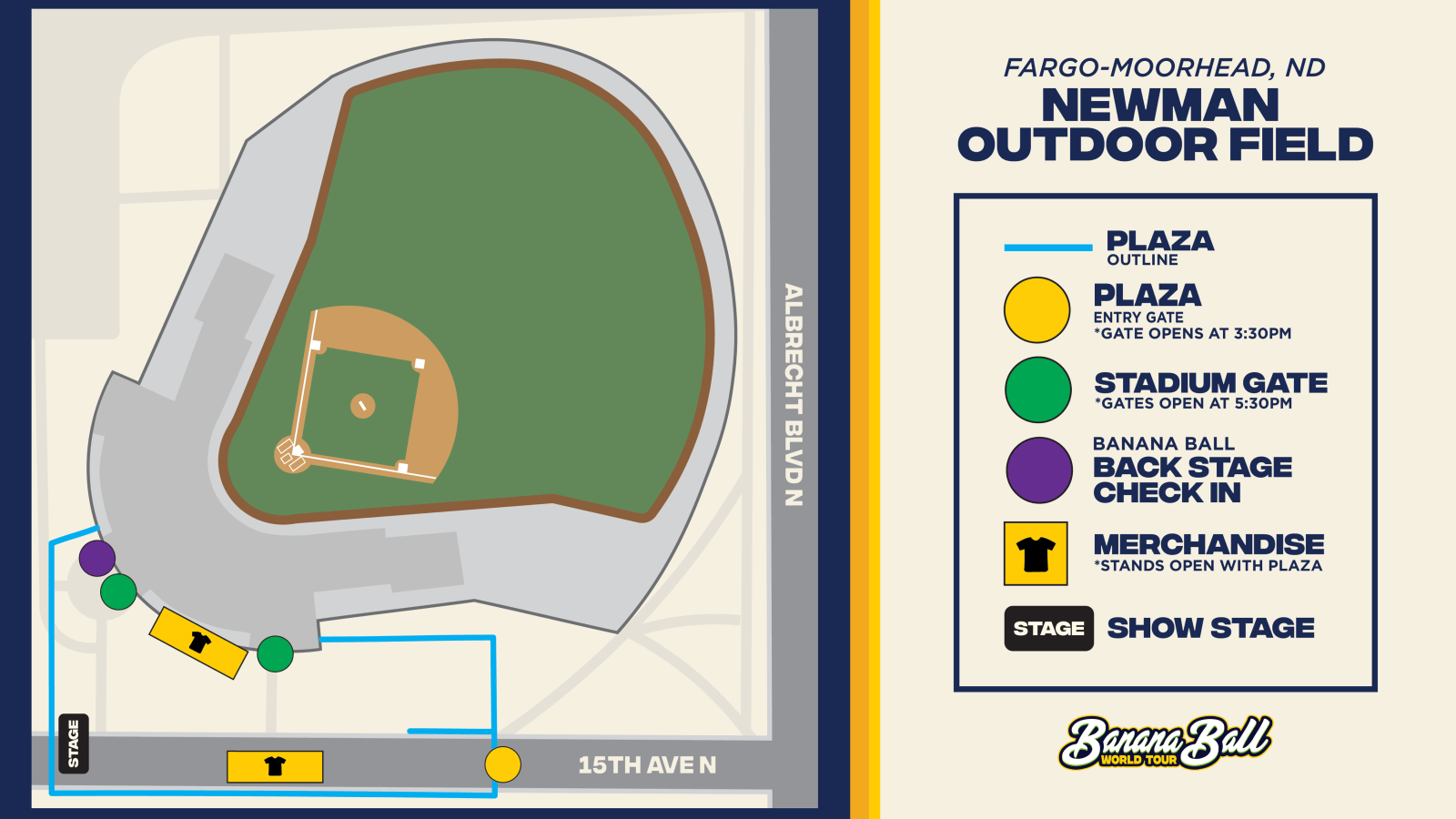
Get ready to dive into the action before the game even starts! Our Pre-Game Plaza offers an unforgettable experience filled with energy, excitement, and entertainment for fans of all ages. From live performances to interactive fun, it’s the perfect way to kick off your Banana Ball adventure.
At the heart of this Pre-Game excitement is The Pre-Game Show – the ultimate kickoff experience! Hosted by our energetic broadcasters and lively cast members, this show sets the tone for an unforgettable day of Banana Ball. Starting an hour before gates open, The Pre-Game Show features special appearances from players, cast, mascots, and other surprise guests. It’s a must-see event packed with music, dancing, laughter, and excitement to get you hyped up before gates even open!
You will also have the chance to swing by the merchandise tents during the Pre-Game plaza! You’ll find exclusive gear for the two teams playing in your city – because nothing says “game day ready” like rocking the freshest Banana Ball swag!
The Plaza is a ticketed space, fans must have tickets to the game to access the Plaza – no additional purchase required..
Fan Services: Fan Services is located on concourse level and handle all seating inquiries for that particular game.
First Aid Location: The main First Aid office is located on concourse level. Please alert an usher or a staff member to request EMS attention if a fan is unable to go to the First Aid location.
Smoking: Smoking, including the use of electronic cigarettes or vaporizers, is only permitted in the designated area of the beer garden.
Water Bottles: Refillable water bottles are allowed inside Newman Outdoor Field as long as they are empty. We have two water fountains to fill water bottles located on the concourse.
Banana Ball Merchandise will be available in the Plaza and in the Stadium. Merchandise will be available exclusively for the two teams playing in your city.
Our Banana Ball Merchandise Tents are CASHLESS.
Want to show up to your game in style? Check out our online store by clicking here!
Food: The ballpark will have your usual ballpark goodies like hot dogs and cheeseburgers available for purchase on site. Bring your appetite – treat yourself.
Beverages: There will be a delightful selection of alcoholic beverages available for purchase on site, if that is your thing.
For a full ballpark guide, click here!
Accessible Seating: Accessible seating is sold during the purchasing process while inventory lasts. After that point fans can visit Fan Services on the date of the game to request accommodations. Please note that gameday relocations cannot be guaranteed.
Service Animals: Registered Service Animals are allowed into Newman Outdoor Ballpark.
Hey K Club!
We’re all about trying new things around here, so we’ve got a new K Club activity for you in Fargo this weekend!
To get started, copy the link below and paste it into your browser of choice (Safari, Chrome, Google, etc.). Once you’re there, choose one of the Bingo cards, use the drawing tools on your phone or device to mark your squares, and get ready for some game-day fun!
Each card is packed with exciting moments, player sightings, crowd interactions, and Banana Ball magic for you to spot throughout the game.
Think you can get a Bingo? Put your observation skills to the test and see how many squares you can mark off before the final out!
Once you’ve completed a Bingo, be sure to submit your card using the form provided. But don’t stop there—keep playing to see if you can complete even more squares and earn ultimate bragging rights!
Good luck, have fun, and as always, make some memories along the way. We can’t wait to see what you find!
Ready to play? Grab your Bingo card and let the games begin!
Not a part of the K Club this season? Click here to add your name to the 2027 Interest List for information about joining in the 2027 season!
What It Is: The Banana Ball Backstage experience includes admission PLUS early entry for an exclusive meet and greet experience on the field with our players and cast members! It will also include some fun swag items!
Start Times:
Friday, June 26th: 4:45pm
Saturday, June 27th: 4:45pm
Check In: On game day, you will need to check in for the Banana Ball Backstage Experience. We recommend you are checked-in at least 15 minutes before your start time. Further information about where to check in will be shared here and emailed to you closer to game day
*If weather does not permit for the on field experience, we will relocate to a safe and dry area!
Check out our friend Visit Fargo-Moorhead page for information about places to stay, play, and eat during the Banana Ball games in the Fargo-Moorhead area! View here!
We never want to talk about the “4 letter word that starts with an R”, but sometimes it’s wise to.
“It’s raining where I am coming from – Is the game still on?” – the answer is YES! Keep in mind, the ballpark is in a big and beautiful area. While it may be raining where you are coming from, there is probably sunshine and butterflies in Bananaland.
Even if it’s wet – We always closely monitor the weather, and do everything humanly (and Bananaly) possible in order to play games as they are scheduled.
9 times out of 10, we’re playing ball once the weather clears. 10 times out of 10, we STILL put on a heck of a show!
Best thing you can do is plan to be at the ballpark ready to rock, as we anticipate everything to start on time! Should things change, we will communicate via email as well as post on our social media accounts!