
Know Before You Go
Chicago, IL
No upcoming games scheduled here yet.
Wrigley Field
1060 W Addison St, Chicago, IL 60613
Your Gameday
Typical gameday Times are relative to first pitch. Exact times appear once games are scheduled here.
- -4h 30m Pre-Game Plaza Opens
- -4h 30m Player Appearances
- -3h 30m Fire Drill Live! Show
- -2h Gates Open Have your digital ticket ready
- Go First pitch
Everything Else
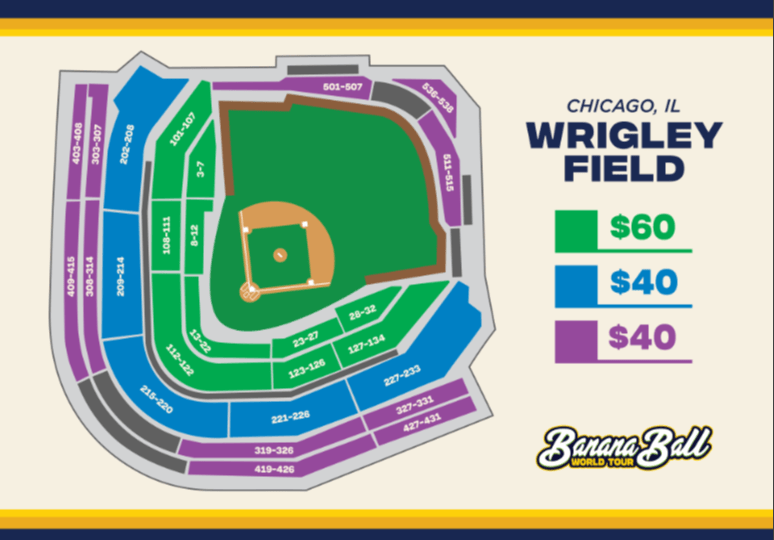
Ticket Zones & Seating Assignments:
Banana Ball tickets are sold by Ticket Zones. The Ticket Zones below correspond to the ballpark map on the left.
Closer to game day, you will receive a specific Section, Row, and Seat that is assigned within the Ticket Zone that was originally purchased.
Exit/Re-Entry: Re-entry is not allowed at Wrigley Field. Once your ticket has been scanned and you enter through a ticket-scanning zone, you will not be permitted to re-enter the stadium.
Pre-Game Day Assistance:
Closer to the game digital tickets will become available for download to mobile wallet. Download your tickets PRIOR to arriving at the ballpark. If you are unable to download the tickets prior to the event, please visit Ticket Help as directed in Game Day Assistance.
Need help with your tickets before game day? Check out our Ticket FAQ.
Game Day Assistance:
If you have any issues with tickets on game day, stop by one of our Ticket Help Tents for assistance. A Ticket Help station is available at each ticket scanning location outside the ballpark, as well as in the plaza before the gates open.
For the best gameday experience – download the Fans First Tickets Management App!
This app is your one stop shop! Whether you already have tickets or you’re looking for seats, everything lives here!
- View and access your tickets
- Transfer tickets to friends and family
- List tickets on the official Marketplace
- Browse available tickets for upcoming games
- Scan in quickly on gameday
Apple Wallet
Use the steps to download your tickets into your Apple Wallet for scanning!
- Log In to your Fans First Tickets Account
- Click Access Game Day Tickets
- Click Add to Apple Wallet
- Input your Pin or Face ID
- Click Add in the Top Right Corner
- Go to Apple Wallet App on your Device
- Once your Tickets Match the Picture Above, You Are Ready to Scan!
Google/Android Wallet
Use the steps to download your tickets into your Google Wallet for scanning!
- Log In to your Fans First Tickets Account
- Click Access Game Day Tickets
- Click Add to Google Wallet
- Input your Passcode
- Click Add in the Top Right Corner
- Go to Google Wallet app on your Device
- Once your Tickets Match the Picture Above, You Are Ready to Scan!
Red Line
The CTA Red Line provides direct service to Wrigley Field via the accessible station at Addison. Fans can transfer to Red Line trains from all other rail lines and from most east-west bus routes. CTA Bus #152 (Addison) and CTA Bus #22 (Clark) both stop at the intersection of Clark & Addison streets. For more details, call the CTA Hotline at 773-836-7000 or visit www.transitchicago.com.
Direct service to Wrigley Field via the accessible station at Addison.
- Transfer to Red Line trains from all other rail lines and from most east-west bus routes.
- Board Red Line from stations in the State Street subway downtown, or from Howard, where fans can connect from Purple or Yellow Line trains serving the northern suburbs.
- Convenient Park & Ride at Howard, $5 (more than 550 parking spaces).
Yellow Line
- Convenient Park & Ride at Dempster-Skokie, $4 (more than 400 parking spaces)
- Yellow Line station is just three blocks east of the Edens Expressway.
CTA Buses
Several CTA bus routes also provide convenient service to Wrigley Field:
- #8 Halsted buses operate north on Halsted from 79th Street to Broadway/Waveland.
- #22 Clark buses operate north through the Loop on Dearborn and south on Clark from Howard.
- #152 Addison buses operate on Addison from Cumberland on the west to Lake Shore Drive on the east.
Visit www.transitchicago.com/fares for more detailed information on rates of fare, how you can pay, and where fares may be purchased
ride share
Ride share services will have a geo-fence for pick-up and drop-off spots around Wrigley Field for game and event days. The pick-up locations will be at Addison Street between Broadway and Halsted Street, and at Irving Park Road between Clark Street and Seminary Avenue. The Cubs strongly encourage the use of public transportation for events at Wrigley Field. Learn more at Cubs.com/Transportation
Pace Wrigley Field Express
Pace Wrigley Field Express bus service will operate for all three Banana Ball games. Visit www.pacebus.com/wrigleyfield for more information on schedule, routes and fares.
Metal Detectors: For your safety, Wrigley Field requires all guests, staff and media to be screened prior to entry. Using our touchless screening process, guests do not have to remove items such as mobile phones, wallets and keys before passing through the metal detector.
Bag policy: The following bag restrictions are in place at Wrigley Field. Backpacks (including clear backpacks), hard-sided coolers (regardless of size) and bags larger than 16 x 16 x 8 inches are NOT permitted at Wrigley Field. Other bags (such as wallets, purses, drawstring bags, fanny packs, lunch bags, briefcases and soft-sided coolers) smaller than 16 x 16 x 8 inches in size are permitted. Exceptions will be made for medical bags and diaper bags that accompany guests with young children. Bags are subject to inspection.
Exit/Re-Entry: Re-Entry is not allowed at Wrigley Field after your ticket is scanned.
The Gallagher Way plaza has limited capacity. Once Capacity is reached, scanning into Gallagher Way will be paused until gates into the stadium open.
Merchandise will be available inside the plaza as well as outside of the plaza on Waveland Ave and Sheffield Ave.
Gates into the ballpark open at 4:30pm on Friday / 1:30pm on Saturday / and 12:30pm on Sunday.
The Plaza is a ticketed space, fans must have tickets to the game to access the Plaza – no additional purchase required.
Get ready to dive into the action before the game even starts! Our Pre-Game Plaza at Gallagher Way offers an unforgettable experience filled with energy, excitement, and entertainment for fans of all ages. From live performances to interactive fun, it’s the perfect way to kick off your Banana Ball adventure.
At the heart of this Pre-Game excitement is Fire Drill Live! the ultimate kickoff experience! Hosted by our energetic broadcasters and lively cast members, this show sets the tone for an unforgettable day of Banana Ball. Starting an hour before gates open, Fire Drill Live! features special appearances from players, cast, mascots, and other surprise guests. It’s a must-see event packed with music, dancing, laughter, and excitement to get you hyped up before gates even open!
You will also have the chance to swing by the merchandise tents during the Pre-Game plaza! You’ll find exclusive gear for the two teams playing in your city, because nothing says “game day ready” like rocking the freshest Banana Ball swag!
Fan Services: The Fan Services Booth is located on the main concourse directly behind home plate and in the Budweiser Bleachers by the Budweiser Bleacher Gate. A Ticket Help station will be available in the plaza area before gates open.
First Aid Locations: The Advocate Health Care First Aid station is located behind home plate on the main concourse. Signage identifies this area. A physician and registered nurse and emergency medical technicians are on hand for all games. Automated external defibrillator (AED) machines are located throughout the ballpark, including in First Aid. First Aid also includes a restroom and dedicated nursing mother’s room.
Nursing Rooms: Nursing mothers seeking a private, quiet accommodation are welcome to use the Mamava Pod nursing station located just inside the Gallagher Way Gate. First Aid, located behind home plate on the main concourse, also includes a restroom and dedicated nursing mother’s room.
Strollers: Collapsible, umbrella strollers that can fit underneath the seat are permitted in Wrigley Field. All other strollers can be claim checked at the Cubs’ Bike Valet Service.
Sensory Bags: Sensory bags, provided by KultureCity, are available to assist individuals to ensure a comfortable and positive experience at Wrigley Field. A sensory bag is available for guests to check out at no cost from the Fan Services Booth on the main concourse and in the Budweiser Bleachers. The sensory bags at Wrigley Field include a pair of noise-canceling headphones, a fidget tool and mood cards.
Sensory Room: Fans needing to decompress from sensory sensitivities during games and events at Wrigley Field can visit the sensory room. The sensory room was designed and created in partnership with KultureCity to promote an accommodating and positive experience for all guests of all ages with sensory needs and is located on the main concourse next to the Fan Services Booth directly behind home plate.
In the sensory room, guests will find a variety of calming and interactive installations. The room is equipped with a sound machine, gentle lighting, Sparkle Eco Cubs that display LED lights with touch sensors, a tactile texture wall and other features.
Cashless Policy: All purchases within Wrigley Field are cashless. Acceptable payments include a credit card, debit card, Apple Pay or mobile wallet. Reverse ATMs are available for fans to convert cash to a card that can be used for purchases at Wrigley Field and elsewhere. Reverse ATMs are located inside the Marquee Gate and in the Budweiser Bleacher concourse.
Exit/Re-Entry: Re-Entry is not allowed at Wrigley Field after your ticket is scanned.
Banana Ball Merchandise will be available outside the ballpark and inside the Plaza. Merchandise will be available exclusively for the two teams playing in your city.
FANS ARE HIGHLY ENCOURAGED TO PURCHASE MERCHANDISE BEFORE ENTERING THE SHOW.
Our Banana Ball Merchandise Tents are CASHLESS.
Want to show up to your game in style? Check out our online store by clicking here!
For the most up-to-date list of all your food and beverage options and locations, visit the Concessions Guide in the MLB Ballpark app. In-seat vending also is available. All transactions are cashless.
Accessible Parking:
Parking for persons with a valid disability license plate or placard is available on a game-by-game basis in the Toyota Camry Lot located at 1126 W. Grace St., Chicago, IL 60613. Spaces are subject to availability, and all fan parking in the Toyota Camry Lot is paid parking. We encourage guests with disabilities to reserve accessible parking in advance online at Cubs.com/Parking by clicking the button to reserve your parking with SpotHero.
Accessible golf cart shuttle service is available on a first-come, first-served basis and operates between the Toyota Camry Lot, 2.5 blocks north of Wrigley Field, and the Left Field Gate located on Waveland Avenue. There is an accessible golf cart shuttle which can accommodate wheelchairs, including motorized wheelchairs and scooters. There also is an eight-passenger golf cart shuttle which can only accommodate portable wheelchairs and foldable walkers. Please note you cannot reserve the service ahead of time. The golf carts run continuously before, during and after the game, beginning three hours before first pitch until one hour after the game ends.
Service Animals: Although pets, including therapy or emotional support animals, are prohibited at Wrigley Field, we welcome service animals recognized by federal law. “Service Animals” are defined as dogs (or in some cases, miniature horses) that are individually trained to do work or perform tasks for people with disabilities. Please be prepared to identify your dog as a Service Animal and the task your animal has been trained to perform.
Elevators: Below is a list of available elevators at Wrigley Field:
- The elevator by the Marquee Gate provides access to the Terrace and Upper levels.
- The elevator by the Left Field Gate provides access to the Terrace and Upper levels.
- The elevator by the Wintrust Right Field Gate provides access to the Terrace and Upper levels.
- The elevator in the left-field corner between the Left Field Gate and Budweiser Bleachers provides access to the Field Box and upper level of the Budweiser Bleachers.
- The elevator in the right-field corner between the Wintrust Right Field Gate and Budweiser Bleachers provides access to the Field Box.
- The elevator by the Budweiser Bleacher Gate provides access to the upper level of the Budweiser Bleachers.
- Two elevators located in the Budweiser Bleacher concourse provide access to the left- and right-field porches.
Accessible Services: Accessible golf cart services are offered to and from the Toyota Camry Lot to the Left Field Gate, located on Waveland Avenue. The accessible golf cart shuttle can accommodate motorized wheelchairs and scooters. There also is an eight-passenger golf cart shuttle available. This shuttle can only accommodate portable wheelchairs and foldable walkers.
You cannot reserve the service ahead of time. The golf carts run continuously before, during and after the game, beginning three hours before first pitch until one hour after the game ends.
Wheelchair Services: For those individuals who require assistance from the gates to their seats, complimentary wheelchair service is available. Upon entering the ballpark, please ask a Wrigley Field associate for assistance. Guests utilizing wheelchair assistance will receive a ticket from their attendant to arrange a postgame pick-up time. Wheelchair service is provided on a first-come, first-served basis and reservations are not accepted. Wheelchair assistance is only provided to and from the seating location and gate, and wheelchairs are not permitted to go off property. The Club does not provide storage for any personal belongings including wheelchairs, walkers and scooters.
Due to the way the plaza is set up this weekend in Chicago, we won’t have an exclusive K Club zone available. This means there will be no separate K Club area in the plaza or inside the ballpark.
We do have K Club-exclusive pins to celebrate the Firefighters’ first MLB stadium this year! Pins are limited to one per membership per day and will be available for pickup in the plaza ONLY during the times below.
Friday: 4:45 – 6:45 PM
Saturday: 1:45 – 3:45 PM
Sunday: 12:45 – 2:45 PM
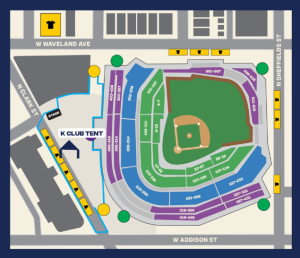
*You may exit into the Plaza (Gallagher Square) to access the K Club tent. Please do not exit through a ticket-scanning zone, as you will not be able to re-enter.
To add to the already fun weekend, we’ll also have trivia every day! The link will be uploaded here the morning of every show.
Not a part of the K Club this season? Click here to add your name to the 2027 Interest List for information about joining in the 2027 season!
What It Is: The Banana Ball Backstage experience includes admission PLUS early entry for an exclusive meet and greet experience on the field with our players and cast members! It will also include some fun swag items!
Start Times:
Friday, July 24th: 3:30pm
Saturday, July 25th: 12:30pm
Sunday, July 26th: 11:30am
Check In: On game day, you will need to check in for the Banana Ball Backstage Experience. We recommend you are checked-in at least 30 minutes before your start time. Further information about where to check in will be shared here and emailed to you closer to game day.
*If weather does not permit for the on field experience, we will relocate to a safe and dry area!
Your favorite Banana Ball players and cast members will be serving up coffee, donuts, and dance moves at two local Dunkin’ s. If you’re in the area and want to have a little extra Banana Ball fun, come on through to Dunkin’.
Come see us at Dunkin on Thursday July 23rd, from 9am-11am!
Address 1: 4058 W Peterson Ave, Chicago, IL
Address 2: 6332 N Broadway St, Chicago, IL
Looking for places to eat, stay, and play in Richmond? Check out this guide that our friends over at Visit Richmond put together!
We never want to talk about the “4 letter word that starts with an R,” but sometimes it’s wise to.
“It’s raining where I am coming from – Is the game still on?” -the answer is YES! Keep in mind, the ballpark is in a big and beautiful area. While it may be raining where you are coming from, there is probably sunshine and butterflies in Bananaland.
Even if it’s wet – We always closely monitor the weather, and do everything humanly (and Bananaly) possible in order to play games as they are scheduled.
9 times out of 10, we’re playing ball once the weather clears. 10 times out of 10, we STILL put on a heck of a show!
Best thing you can do is plan to be at the ballpark ready to rock, as we anticipate everything to start on time! Should things change, we will communicate via email as well as post on our social media accounts!