
Know Before You Go
Washington, DC
 VS
 Party Animals vs Firefighters
Nationals Park
1500 South Capitol Street SE, Washington, DC 20003
Your Gameday
Saturday, May 22 Party Animals vs Firefighters
- 2:00pm Plaza Opens + Player Appearance - Firefighters
- 2:30pm Player Appearance - Party Animals
- 3:00pm Pre-Game show Begins
- 4:30pm Gates Open
- 6:30am Show Starts
Sunday, May 23 Party Animals vs Firefighters
- 10:00am Plaza Opens + Player Appearance - Firefighters
- 10:30am Player Appearance - Party Animals
- 11:00am Pre-Show Begins
- 12:30pm Gates Open
- 2:30am Show Starts
Gameday Information
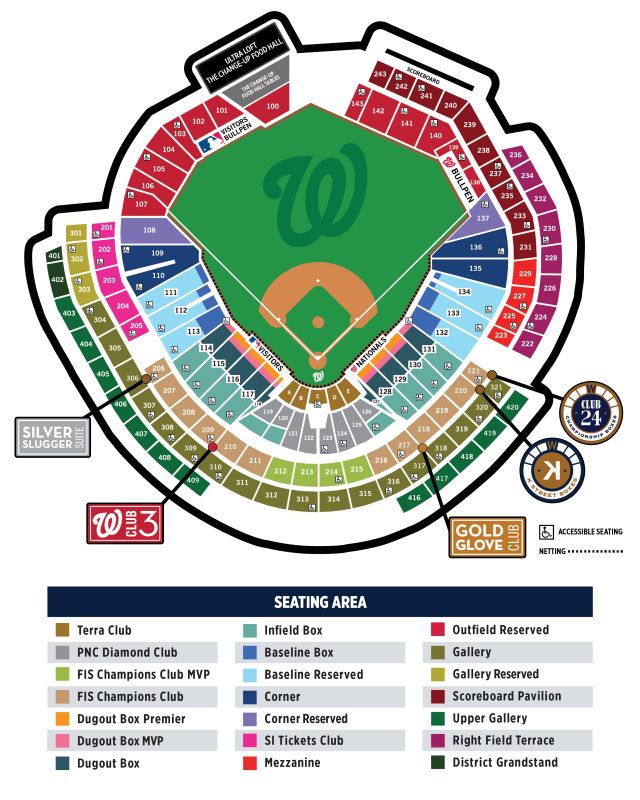
Banana Ball tickets are sold by Ticket Zones. Closer to the event, ticket holders will receive a specific Section, Row, and Seat assignment which corresponds to the stadium map. Keep an eye on the Fans First Tickets Management App for any updates to your tickets!
Pre-Game Day Assistance:
A few days prior to the event, your digital tickets will become available for download to your mobile wallet. For the smoothest entry experience, please follow the steps below to add all tickets to your digital wallet.
Need help with your tickets before game day? Check out our Ticket FAQ.
For help on show day:
We’ve got you covered! If you experience any issues with your tickets, visit one of our Ticket Help Tents. A Ticket Help station is available at each ticket scanning location outside the stadium.
For the best gameday experience – download the Fans First Tickets Management App!
This app is your one stop shop! Whether you already have tickets or you’re looking for seats, everything lives here!
- View and access your tickets
- Transfer tickets to friends and family
- List tickets and browse available tickets on the official Marketplace
- Scan in quickly on gameday
- Enable app notifications for important updates
Apple Wallet
Use the steps to download your tickets into your Apple Wallet for scanning!
- Log In to your Fans First Tickets Account
- Click Access Game Day Tickets
- Click Add to Apple Wallet
- Input your Pin or Face ID
- Click Add in the Top Right Corner
- Go to Apple Wallet App on your Device
- Tap your ticket & you are ready to scan!
Google/Android Wallet
Use the steps to download your tickets into your Google Wallet for scanning!
- Log In to your Fans First Tickets Account
- Click Access Game Day Tickets
- Click Add to Google Wallet
- Input your Passcode
- Click Add in the Top Right Corner
- Go to Google Wallet app on your Device
- Tap your ticket & you are ready to scan!
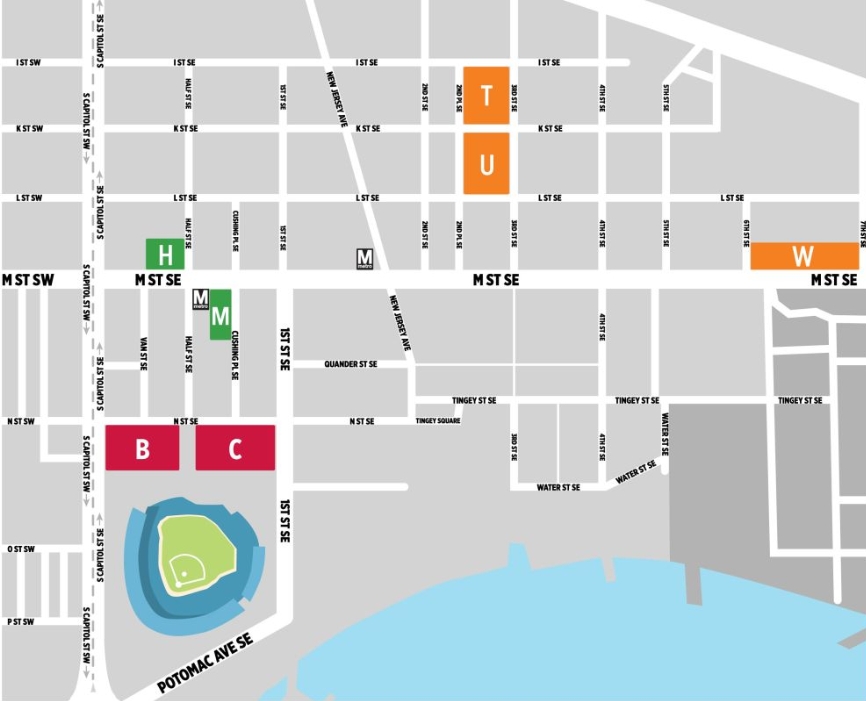
The Nationals have a variety of parking options available to make it easy for fans to get to Nationals Park. Garages will open one (1) hour prior to plaza opening.
All Nationals parking garages and lots close 1 hour after the conclusion of each game. All Nationals parking garages and lots are managed by parking professionals. Tailgating is not permitted in Nationals parking garages and lots.
ADA Parking: Accessible parking spaces are available in all lots for Nationals Park guests. Ticket holders requiring accessible parking spaces should call 202.675.NATS (6287), Option 1 (one) then Option 1 again for information on availability in specific lots.
Fans must present their state or government issued disabled parking placards/license plates, as well as their single game parking pass purchased online. Guests of Nationals Park are strongly encouraged to arrive to these lots at least one hour or more prior to game time to have an opportunity to access these spaces.
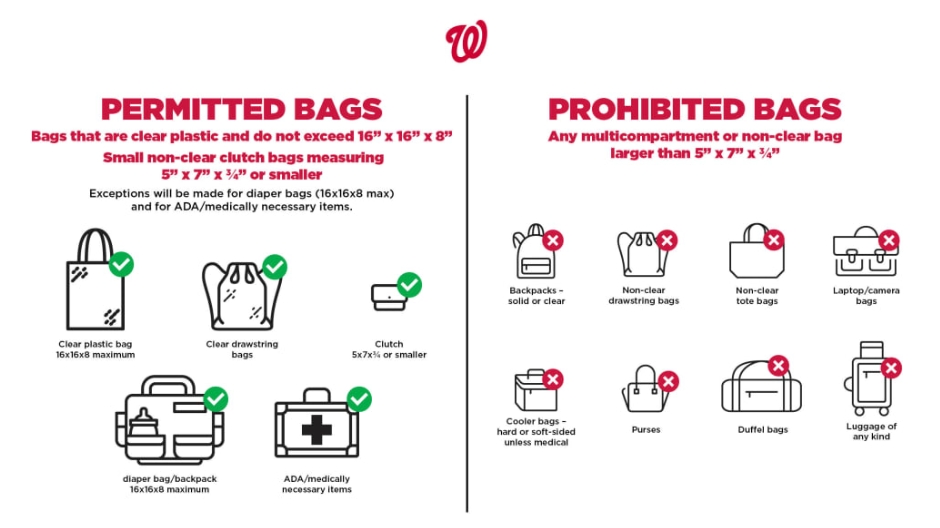
Bag Policy:
- Backpacks, including clear backpacks, may not be brought into Nationals Park except as otherwise outlined in the Nationals Park Bag Policy. Please view the GUEST CONDUCT POLICY for a list of Prohibited Items.
- Anyone arriving with a prohibited bag will be directed to use the Binbox locker service or to make their own arrangements. Binbox locations can be found at Center Field, Left Field, and Home Plate Gates.
- With very limited exceptions, bags must be clear with the contents plainly visible, or they will not be permitted inside Nationals Park.
- For specific details, please see the Nationals Park Bag Policy at nationals.com/bagpolicy.
Re-Entry: Re-Entry is NOT permitted. Once fans have scanned into the plaza or ballpark, they are not permitted to leave and re-enter on the same ticket.
Get ready to dive into the action before the game even starts! Our Pre-Game Plaza offers an unforgettable experience filled with energy, excitement, and entertainment for fans of all ages. From live performances to interactive fun, it’s the perfect way to kick off your Banana Ball adventure.
At the heart of this Pre-Game excitement is Fire Drill Live! —the ultimate kickoff experience! Hosted by our energetic broadcasters and lively cast members, this show sets the tone for an unforgettable day of Banana Ball. Starting an hour before gates open, Fire Drill Live! features special appearances from players, cast, mascots, and other surprise guests. It’s a must-see event packed with music, dancing, laughter, and excitement to get you hyped up before gates even open!
You will also have the chance to swing by the merchandise tents during the Pre-Game plaza! You’ll find exclusive gear for the two teams playing in your city—because nothing says “game day ready” like rocking the freshest Banana Ball swag!
The Plaza is a ticketed space, fans must have tickets to the game to access the Plaza – no additional purchase required.
-
-
be no larger than 2 feet by 4 feet.
-
may not be comprised of or supported by wood, metal or other hard materials that could be dangerous in a crowded public setting
-
not be affixed to or draped over any part of the baseball park structure, whether facing inside or outside of the baseball park
-
Fan Services: The Banana Ball Ticket Experience Team will be located in primary guest services booths to assist with all seating needs. Please note, relocations are never guaranteed and no upgrades are available. The main Fan Services area is located on the Main Concourse behind Section 127. A Ticket Help station will be available in the plaza area before gates open.
Nationals Park contains three Guest Services locations, which are located behind Sections 103, 131, and 320. Guest Services locations open at the same time as the Nationals Park gates and the location at Section 103 remains open until 45 minutes following the game to assist guests with lost and found items, lost or missing guests, transportation information, emergencies, accommodations for guests with disabilities and any other questions or concerns guests might have.
First Aid: First Aid is available for each game. First aid stations are located at the following sections: 107, 131, and 312; and include restroom facilities that, like other restrooms at Nationals Park, are fully accessible for guests with disabilities. First Aid Rooms also offer a variety of additional accommodations for guests with disabilities and are staffed by medical personnel from AMR.
Baby Changing Stations: Baby changing stations and tables can be found in all public restrooms inside Nationals Park, as well as in the Nursing Lounge located in section 221.
Lost & Found: Lost and found items will be turned in to the Nationals Park Main Guest Services Office located adjacent to the Center Field Gate. Guests needing assistance in retrieving Lost and Found items during non-game hours may fill out a claim form on the Nationals website nationals.com/lostandfound.
Payment: Apple Pay is the preferred mobile payment method at Nationals Park and is accepted at most locations.
Water Bottles: Water bottle fillers are located throughout the ballpark for your convenience to refill reusable water bottles.
MAIN CONCOURSE: 108/109, 113/144, 120, 126, 134/135, 137/138, 142/143
CLUB LEVEL: 201, 204/205, 220, 231/233, 243 (Bud Terrace)
FIS CHAMPIONS CLUB: 208/209, 213
GALLERY LEVEL: 303/304, 310/311, 316/317
For the full A-Z guide of Nationals Park, please click here!
Banana Ball merchandise will be available in the Plaza and in the Stadium. Merchandise will be available exclusively for the two teams playing in your city.
Our Banana Ball Merchandise Tents are CASHLESS.
Want to show up to your game in style? Check out our online store by clicking below!
Nationals Park offers a variety of specialty food & beverage options, traditional ballpark fare, and several popular bars and restaurants.
Click below to see Nationals Park Concessions guide!
Nationals Park concessions and retail stands are cashless. Mobile payment is the preferred method of payment.
Accessible Seating: Wheelchair spaces, accessible seats, and companion seating are located around the ballpark. Please fill out this form. This for is for requests only and cannot be guaranteed.
Wheelchair Service: If you are in need of a wheelchair, please see any game day team member or visit any Guest Services location to request assistance.
Accessible Parking: Accessible parking spaces are available in all lots for Nationals Park guests. Ticket holders requiring accessible parking spaces should call 202.675.NATS (6287), Option 1 (one) then Option 1 again for information on availability in specific lots.
Ramps: There are two ramps at Nationals Park, both of which access the four public levels of Nationals Park. The ramps are located behind Sections 107 and 131.
Have K Club exclusive tickets? We’ve got some extra fun in store for you!
All K Club ticket holder information, including venue and/or ticket perks, will be communicated ahead of your game day. Keep your eyes peeled and be sure to check back here as game day approaches for the latest details.
GET READY TO GO BACKSTAGE!
You’re not just coming to watch Banana Ball… you’re getting a chance to experience the magic behind it! Banana Ball Backstage is an exclusive pregame experience that brings you closer to the players, personalities, and unforgettable moments that make Banana Ball unlike anything else.
Get ready for a player-packed meet and greet filled with opportunities for photos, autographs, and personal interactions with some of your favorite Banana Ball stars! Along the way, you may discover a few backstage secrets, get a behind-the-scenes look at the show, and experience some fun surprises! Every Banana Ball Backstage experience is a little different, and that’s part of the fun!
What You Need to Know
If you’ve purchased Banana Ball Backstage tickets, keep an eye on your inbox! You’ll receive an email on the Tuesday before your event with important event-specific information, including arrival instructions, check-in details, and everything you need to know before your Backstage experience. We can’t wait to welcome you Backstage!
Looking for places to eat, stay, and play in D.C.? Keep your eyes peeled for fun things coming your way!
We never want to talk about the “4 letter word that starts with an R”, but sometimes it’s wise to. Our team closely monitors the forecast and does everything humanly (and Bananaly) possible to keep games on schedule. 9 times out of 10, we’re playing ball once the weather clears. 10 times out of 10, we STILL put on a heck of a show!
Even if it’s raining where you’re coming from, conditions at the ballpark may be completely different. So, our advice? Plan to arrive on time and ready to have a ball!
If weather impacts game time or any event details, we’ll communicate directly with ticket holders through app notifications. We’ll also share updates across our social media channels so you know exactly what’s happening.